
Showing posts with label livescribe sky wifi. Show all posts
Showing posts with label livescribe sky wifi. Show all posts
Livescribe Releases Firmware Update that Adds Sound Stickers
Supporting Students with Special Needs in the Mainstream with the Livescribe Sky WiFi Smartpen

I have been using the Livescribe Smartpens since it was released and have recommended it to countless teachers and students to help support their learning. The ability to link audio to the ink on the page is really ingenious and is a wonderful tool for students who have difficulty listening to lectures and taking notes at the same time. With a simple tap of the pen on the paper the notes can be listened to which is a real game changer for students. With the introduction of the Livescribe Sky WiFi Smartpen, archiving and syncing has changed; all accomplished via WiFi and a Evernote account. Now without having to think about it you can do your work and your notes are archived in the cloud and accessible via any device connected to the internet. A dream come true for many us who want to have access to our notes. While there are other services that let you save notes in the cloud, the Livescribe Sky Wifi Smartpen gives you the ability to store your notes and audio in one place- which is fantastic. While there are lots of ways to use the Livescribe Sky WiFi Smartpen in schools, let me suggest one which could have powerful learning ramifications.
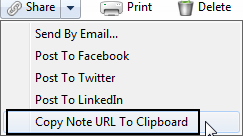 With the move to the least restrictive environment it is not unusual when looking at a child's I.E.P. to find that many students who are in the mainstream are being supported by a special education teacher or instructional aide in their general education classroom. Having an extra pair of hands and eyes is a great accommodation for students who may need the extra support in the mainstream. Now what would happen if that special education teacher used the Livescribe Sky Wifi Smartpen to take notes for those students that have it in their I.E.P. as an accommodation? Now we are talking! The Livescribe Sky Wifi Smartpen can be used to share just the notes (ink) or the ink and audio- it all depends on how it is going to be utilized. Now that the Livescribe Sky Wifi Smartpen syncs with Evernote-sharing the notes just got a whole lot easier! You see from within Evernote, with a click of the mouse you can make the note shareable via a URL. Once you have the URL you can post it on your website or portal and now every student that needs access to the note can access it from any browser connected to the web. Supporting students with notes just got a whole lot easier and enable you to provide the notes or the notes and associated audio. With you in control of the Livescribe Sky Wifi Smartpen you can decide which makes the most sense and provide your students with a great digital support. Providing students with classroom notes just got a lot easier and one that I know your students will love to access. So if you are a special education teacher who is doing in-class support think about how you can use the Livescribe Sky Wifi Smartpen to take note taking to whole new level- you will be glad you did!
Using the 3-D Recording Headset with the Livescribe Sky Wifi Smartpen
Last week I used the Livescribe SKY WiFi to create some eLearning materials for one of the graduate courses that I teach at the college. After I had created the materials I noticed that when using the pen to record it does pick up a bit of the pen moving across the paper which adds some scratchy audio to the materials. So this weekend I decided to see what would happen if I recorded a session with the Livescribe SKY WiFi but this time compared the audio with the built-in microphone as compared to the 3-D Recording Headset. It is quite evident that when using the 3-D Recording Headset that you can get a much cleaner audio recording which removes a lot of the scratchiness you hear when using the Livescribe SKY WiFi pen with its built-in microphone. You can hear it for yourself by clicking on the image of the Sticky note. The first sentence was recorded using the Livescribe SKY WiFi with its built-in microphone and the second sentence was recorded using the 3-D Recording Headset. I think you will agree that the second recording has much better sound quality. I know that in the future, I will use the 3-D Recording Headset with my Livescribe SKY WiFi pen when creating eLearning materials for my classes. Click on the note to hear the difference

Livescribe Sky WiFi- Totally Liberating
 Over the last couple of years I had the opportunity to demonstrate the Livescribe Pulse and Echo Smartpens to lots of educators who are interested in learning about new technological for the classroom. Today I had the opportunity to demo the Livescribe Sky WiFi pen for the first time to students who are majoring in education. It was really exciting to be able to demonstrate the Livescribe Sky WiFi smartpen and watch how it magically synced to my Evernote account. The students were really amazed how easy it was to use and the pen's ability to record a lecture. They were also amazed that you could and listen to the recording via the paper replay or on the web in Evernote. If you haven't taken a look at the Livescribe Sky WiFi pen, I suggest you do and find out how liberating it is to sync and archive your notes over WiFi. You will be glad you did!
Evernote 5 Released for iOS Devices

Livescribe SKY WiFi Pen Comes to the Rescue

Being displayed in the season of the general elections is a real problem for many people and recently our Governor announced that we would be able to vote via email or fax as long as we can get the Vote by Mail Ballot to the County Clerk's Office. With this in mind I set off to download the Vote by Mail Ballot from the website which I was able to save as a PDF file. Now how would I get a good looking signature on the ballot? Actually it was quite simple, since I had brought along my Livescribe SKY Wifi Pen with me to my sister's home. Now all I needed to do was to have my wife and I sign a page in the Livescribe notebook with the Sky WiFi pen and have it automatically uploaded to Evernote. Once the syncing was done, I was able to open up the page on my Evernote account and using the Snipping tool on my laptop, I saved each signature as a JPEG file. Now I was able to go back to the ballot which was saved in a PDF format and using the Signature Tool from within Adobe Acrobat X, I was able to import the image file and use it to digitally sign the ballot. The process took me less then 5 minutes and when I was done I used my eFax account to fax the ballots to the county clerk's office. The process was very quick and straightforward. I will give you an update when I hear back from the Clerk's Office. So remember to vote this Tuesday in the General Election!

Subscribe to:
Comments (Atom)