Pages

Showing posts with label Macintosh. Show all posts

MatchWare Launches MindView 4 Mac, Mind Mapping Software for OS X Lion

Today MatchWare (http://www.matchware.com) announces the release of MindView 4 Mac, a professional mind mapping software ideal for optimizing brainstorming sessions, creating visually driven presentations and displaying project plans in an easy-to-overview timeline. Thomas Henriksen, MatchWare’s Product Manager, explains, “Our user feedback was very clear, Mac customers want a professional mind mapping tool to visually overview ideas and improve communication, collaboration and innovation. MindView 4 Mac provides the professional feature set to drive productivity through seamless integration with Microsoft Office and a cutting-edge presentation mode that ensures brainstorming, organizing and presenting ideas has never been easier.”

The enhanced Microsoft Office integration and ready-to-use templates enable users to effortlessly export their mind maps as professionally formatted Microsoft® Word documents and PowerPoint presentations. With 7 dynamic viewing options including a timeline, new map styles, and innovative presentation options, MindView 4 Mac continues to take mind mapping to the next level. Additional new features include a new formatting toolbar, the ability to record audio commentary as a sound note and attach the file to a mind map branch, open MindView 4 for PC files and the option to export a mind map as a PDF.

MindView 4 Mac’s new presentation mode displays information one branch at a time, enabling users to deliver dynamic, interactive presentations directly from the mind map. Focus mode empowers users to zoom-in on specific areas of the map, allowing participants a clear view of the specific information presented. MindView 4 Mac enables users to customize the placement of branch pictures; further enhancing the capability to provide clear, visual displays to improve the understanding of complex topics.
“I have tested MindView 4 Mac on OS X Lion and the new Presentation Mode and Focus Mode are extremely helpful when presenting my mind maps during meetings. I like the fact that the Focus Mode lets me zoom in automatically on branches in a non-linear way so people in the back of the room easily can see and contribute to brainstorming sessions,” says Frans Merrild, C.E.O of Tell-It Online.

MindView’s unique Timeline view delivers a powerful, visual overview to improve any project planning process and enhance the study of historical and future events. By adding dates or times to the mind map branches, users can simply switch to the Timeline view to instantly display information on a horizontal time axis.

MindView 4 dramatically improves the ability of professionals to capture and share information in one click from a mind map to Microsoft Office, a timeline, a PDF document or a HTML website. Mac users now have a professional productivity tool for turning ideas into action plans.
MindView 4 Mac is available for purchase at http://www.MatchWare.com and the Mac App Store for the upgrade price of 149 USD or 249 USD for a single user license. For more information about MindView, visit http://www.MatchWare.com or follow us on Twitter and Facebook. Contact us for multi-user and educational discounts.

About MindView
MatchWare MindView is professional mind mapping software that allows you to optimize brainstorming sessions and present ideas visually. MindView's mind mapping capabilities provide an effective way to organize and develop ideas, outline reports, and streamline decision making. MindView’s visual hierarchy and professionally designed export templates convert your mind map into a polished presentation with the click of a mouse. Brainstorm topics, storyboard presentations and enhance meeting discussions. Attach pictures and videos, take notes or add hyperlinks – everything will be included in your export.

About MatchWare
Founded in 1992, MatchWare is a leader in intuitive Mind Mapping and multimedia authoring tools for enhancing individuals’ ability to create, visualize, manage and distribute information. The company’s award-winning software packages, MindView, Mediator, and ScreenCorder, offer highly intuitive user interfaces and powerful features at affordable prices. Headquartered in Denmark, MatchWare has subsidiaries in the UK, the USA, Germany, France and Sweden.
  • MatchWare, MindView, MatchWare Mediator, MatchWare ScreenCorder are trademarks or registered trademarks of MatchWare A/S. All other trademarks and registered trademarks used in this document are the property of their respective companies.

The "PaperShow Guy" is Off to MacWorld 2011

Yes- some folks have affectionately coined me the "PaperShow Guy" and I will be in all my glory next week when I arrive in San Francisco for MacWorld 2011. If you get to MacWorld 2011 Conference please stop by the Canson Booth 1001 and say hello and try out PaperShow for Teachers. PaperShow for Teachers won Best of Show at MacWorld 2010, and we are excited to show you the latest developments with the product which educators are really excited about. So stop by Booth 1001 and say hello and try out PaperShow for Teachers. PaperShow for Teachers has a rich set of features that your students will find very engaging. We will be offering special MacWorld 2011 pricing for PaperShow for Teachers as well was for PaperShow Enterprise Edition - so come over and take advantage of the special promotions. Hope to see you there!

Adobe Announces eLearning Suite 2 & Captivate 5


SAN JOSE, Calif. - (BUSINESS WIRE) - Adobe Systems Incorporated (Nasdaq:ADBE) today announced Adobe eLearning Suite 2, a significant upgrade to its tightly integrated, end-to-end solution for easily creating, reviewing and maintaining eLearning content. The suite, now natively compatible with Mac OS in addition to Windows, enables eLearning professionals, educators and trainers to turn creative ideas into dynamic eLearning materials that engage learners with multimedia and interactivity. eLearning Suite 2 - anchored by the new Adobe Captivate 5 - includes Adobe Flash Professional CS5, Adobe Dreamweaver CS5, Adobe Photoshop CS5 Extended, Adobe Acrobat 9 Pro, Adobe Presenter 7 and Adobe Soundbooth CS5.

"Today's educational and professional learning departments are under enormous pressure to deliver impactful content quickly and efficiently," said Naresh Gupta, senior vice president, Print and Publishing at Adobe. "eLearning Suite 2 is a major leap forward in eLearning content creation. It addresses the challenge with its tightly integrated toolset that allows content creators to develop powerful media-rich eLearning experiences without the time and expense of programming."

Adobe eLearning Suite 2 enhances productivity with smarter aggregation capabilities included in Adobe Captivate 5, eLearning extensions for Dreamweaver and Flash, and new application round tripping workflows between authoring and asset creation tools. For example, a course designer can now insert Adobe Photoshop CS5 (PSD) files as smart objects into an Adobe Captivate project and update the images with one click should the original files change without having to resave and reinsert images. Similar workflows exist between the other eLearning Suite components including Adobe Captivate, Soundbooth and Flash.

"Timely, effective training on the use of our products is critical for us and our customers to meet compliance requirements," said Mary McGivern, Instructional Designer, Omnicell, a leading provider of comprehensive, technologically advanced automation that enables healthcare facilities to acquire, manage, dispense, and deliver medications and supplies more effectively. "The new user interface in Adobe Captivate 5 lets me work more efficiently and is now similar to other Adobe products. This will speed up my workflow and help me meet timelines more effectively."

Introducing Captivate 5

Adobe Captivate is the industry-leading, rapid authoring solution for developing demonstrations, application simulations and branching scenarios - without requiring programming expertise while not compromising quality. Version 5, which introduces the software to Mac OS, offers exciting new features that allow users to do more complex tasks faster such as enhanced importing and round tripping for Microsoft PowerPoint.

The new user interface - similar to the Dreamweaver CS5, Flash CS5 and Photoshop CS5 interfaces - lets users create and revise content faster and more easily than ever before by supporting multiple document editing and personalized workspaces. The Properties Inspector tool also boosts time-savings, as course authors can edit object properties in fewer steps. Additionally, eLearning professionals can leverage an expanded asset library and use customizable widgets to quickly create tables and design graphical buttons. Other major enhancements include support for rich animation effects, the ability to import videos in popular formats (AVI, MOV, FLV, MPEG) and synchronize video across multiple slides.

For more effective collaboration, Adobe Captivate 5 customers can upload, exchange and review content, as well as track and report learner scores by signing up for Adobe's online productivity software, Acrobat.com (available separately). Also, a new widget lets students and educators interact via Twitter, facilitating online Q&As and group discussion.

To ease the process of maintaining content, Adobe Captivate 5 introduces Object Style editing, which facilitates changes project-wide with just a few clicks, allowing content creators to easily define and modify the look and feel of buttons, text, images and other elements. eLearning designers can also create Master Slides with preset themes and styles for text, shapes and graphics. This accelerates authoring as contributors can focus on content rather than formatting details, and ensures that the look and feel of an organization's presentations are preserved. Once eLearning content is published, training and learning professionals can track and report key performance metrics via Acrobat.com or their own Web server.

Pricing and Availability

Adobe eLearning Suite 2 and Adobe Captivate 5 are expected to be available via Adobe Authorized Resellers and the Adobe Store at www.adobe.com/store in June. Customers can pre-order Adobe eLearning Suite 2 and Captivate 5 today. Estimated street price for the suite is US$1799; upgrade pricing starts at US$599. Estimated street price for Adobe Captivate 5 is US$799; upgrade pricing starts at US$299. Educational pricing is available for both products.

Both products are compatible with Mac OS X v10.5.7 or v10.6, Microsoft Windows XP with Service Pack 2 (Service Pack 3 recommended), Windows Vista Home Premium, Business, Ultimate, or Enterprise with Service Pack 1 or Windows 7 (certified for 32-bit Windows XP, Windows Vista and Windows 7). The Mac OS version of eLearning Suite 2 does not contain Adobe Presenter.

Helpful Links

eLearning Suite 2 and Captivate 5 Customer Quote Sheet
eLearning Workflows in eLearning Suite 2
eLearning Suite 2 home page
What's new in eLearning Suite 2 (On-demand seminar)
Top new features in Captivate 5
Captivate 5 home page
What's new in Captivate 5 (On-demand seminar)

About Adobe Systems Incorporated

Adobe revolutionizes how the world engages with ideas and information - anytime, anywhere and through any medium. For more information, visit www.adobe.com.

(c) 2010 Adobe Systems Incorporated. All rights reserved. Adobe, the Adobe logo, eLearning Suite 2, Captivate, Flash, Dreamweaver, Photoshop, Acrobat and Soundbooth are either registered trademarks or trademarks of Adobe Systems Incorporated in the United States and/or other countries. All other trademarks are the property of their respective owners.

Photos/Multimedia Gallery Available: http://www.businesswire.com/cgi-bin/mmg.cgi?eid=6275652&lang=en

Press/ Analyst Contacts
Adobe Systems Incorporated
Stefan Offermann, 408-536-4023
sofferma@adobe.com
or
A&R Edelman
Gina Pucci, 650-762-2897
gpucci@ar-edelman.com

Getting a Visual Overview with Wordle

Every once in awhile I like to use Wordle to get an overview of what I have been writing about on my blog. Wordle creates a great visual poster and lets me instantly see what topics I have covered in the past couple of months. So here it is!

Canson to Launch PaperShow for Mac at MacWorld 2010

For the past year I have been using PaperShow extensively when I teach, do presentations, and for webinars. It has been a really indispensable tool and I carry PaperShow in my bag wherever I go. Because of PaperShow's ease of use and portability I can walk into any room and within seconds have a digital flipchart ready to go, to share and capture ideas. I have written about my experiences with PaperShow on this blog for the past year and from day one have asked Canson "when will we see PaperShow for the Mac?" Well that day is finally coming and I am happy to share with you that Canson will launch PaperShow for Mac this week at the MacWorld 2010 Conference to be held in San Francisco.

I have worked closely with Canson during this past year and I will be going to MacWorld 2010 to help them launch their new product. I have been working with PaperShow for Mac for the past couple of weeks and in some ways it is even easier to use than the Windows version. With all of the functionality of the Windows version and the ease of use of the Mac this is a real winner. So if you plan on attending MacWorld 2010, stop by the PaperShow Booth in the Exhibitor Hall-Booth 746 and say hello. I will also be doing a presentation on Friday February 12th, a Product Spotlight Session: Make Your Presentations Come to Life with PAPERSHOW for the Mac from 1:30 PM - 2:00 PM. So stop by the booth or come and learn more about PaperShow for the Mac at my presentation.

Clickfree Transformer Cable Backup Solution

If you have worked with computers for any length of time you know just how important the data that lives on our computers are to us. From our music, to photographs to financial data we all rely on those files being there when we boot up our computers. So the question is, "When was the last time you backed up your computer?" You see it is not a question if your hard disk will fail but a question as to when will it fail. While we go our merry way thinking that our computers will work as they should, there will come a time when you boot up and you get the dreaded error message that your computer will not start up. If a technician can't get the system up an running you will be faced with the option of having to reformat your hard drive and lose all of you files. Wouldn't it be nice if you had prepared for this event and had a backup that you could access to restore all of your data files.? I know the answer to this question, and have been working with a number of products from Clickfree to see how well they work. Clickfree has a number of products that let you easily backup your data files without the need to install any software. Clickfree tries to make the process of backing up your hard drive as fuss free as possible and in this regards- they have accomplished their goal.

I had a chance this week to take a look at Clickfree's Transformer Cable, which turns any external USB drive into a Clickfree backup solution. The Clickfree Transformer Cable is a small USB cable with the attached Transformer pod on it that you simply plug into your computers USB port. Once the Transformer is plugged into your computer you can plug in your external USB drive and within seconds the Clickfree Backup software runs finding, organizing and backing up all of your files. It is really that easy- with no software to install. With the price of external USB drives coming way down in price there is no excuse not to have your data backed up. Clickfree Transformer Cable works with Windows Vista®, Windows® XP and Mac OS X 10.5 or later.

I have to say that the Clickfree's Transformer Cable worked as advertised. I was able to back up my Dell XPS 1210 using the Clickfree's Transformer Cable in a couple of minutes and all I needed to do was plug in my external USB drive into the Clickfree's Transformer Cable. Now I have the peace of mind that my files are safe should my hard drive crash. The Clickfree's Transformer Cable backs up all of your data files and includes a Restore function should you need to restore your files. You can also search for files using the Clickfree Backup Software and access individual files should you need them. Clickfree saves your data files in the native application's file format so that it is easy to access should you need to copy or move them to another computer. The Clickfree Solution backs up over 400 difference types of files from your hard drive so that you can be rest assured that they will be there when you need them. Clickfree Transformer also ships with a small application which you can install to your computer which will remind you to backup your files- you can also set it up the Clickfree Transformer for Unattended Backups as well. You should note that the Clickfree's Transformer Cable Backup Solution does not backup your software applications or your operating system. If this is important to you, you may want to look at another solution (I hope to share this solution with you in another post shortly). But for the peace of mind of having all your data files backed up, the Clickfree's Transformer Cable solution worked as advertised. If you need a simple no fuss method to back up your computer files then this is the way to go- trust me you will be happy you did!

Mind Mapping Updates for Snow Leopard OS X 10.6


For those of you who have upgraded to the latest Mac OS- Snow Leopard you may have encountered some difficulties running your existing applications. While the software companies are well informed about these impending changes that may impact on their software sometimes it is hard to get the patches out the door exactly when the new operating system ships. You will be happy to know that Mindjet has recently released an update for MindManager 7 which will now allow you to run MindManager for the Mac under Apple's latest operating system called Snow Leopard. You can download the update by clicking here.

Likewise, I just received word from CS Odessa that announced that all of the current versions of their ConceptDraw productivity software product line now fully supports the Apple Macintosh OS X 10.6, Snow Leopard operating system. You can find the ConceptDraw Office Update by clicking here. So if you are using ConceptDraw MindMap with Snow Leaopard just click on the link and you will be mind mapping in seconds on your Mac with the latest and greatest operating system.

Camtasia for Macintosh to Be Released - August 25th

I know it has been a long time coming and I am glad to announce that Techsmith will be releasing Camtasia for the Macintosh on August 25th for a special promotional price of $99 dollars until the end of the year. After that Camtasia for the Mac will be priced at $149. I know I have been waiting for this awhile now and I am sure this will become an important part of your instructional toolkit once it is released. I will be talking more about Camtasia for the Mac in future posts.

Vision Objects Releases MyScript for Livescribe Macintosh Version


I have blogged about my experience with the Livescribe Pulse Smartpen since its release and glad to share with you that Vision Objects has released MyScript for Macintosh. MyScript will now give Macintosh Users the ability to convert their handwriting to text for easy editing and formatting. I have used MyScript for Windows with my Livescrobe Pulse Smartpen and found it to work well, even with my handwriting (lets not go there :-).

MyScript for Livescribe is an application that converts your handwritten notes to digital text:

puce

Send your handwritten notes directly from Livescribe Desktop to MyScript for Livescribe for conversion to text.

puce

Use your personal dictionary to add names, terms and abbreviations for even more accurate conversion.

puce

Convert handwriting, shapes, drawings and tables into print.

puce

Edit the resulting digital text directly in My Script for Livescribe application.

puce

Edited results can be sent to Microsoft Word or another word processor, to a text file, to your default email application or saved as a picture file.

CrossLoop for Mac Released


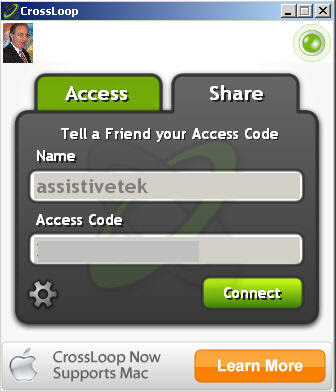
I have been CrossLoop user for some time now and was delighted to learn today that CrossLoop for Mac is available. This easy to use tool allows any two computers to do screensharing and remotely control the other computer. The only problem prior to this announcement, was, that it only worked on the Windows platfrom. With the release of CrossLoop for the Mac you can now have sessions with your Mac as well as you Windows buddies. CrosLoop will allow you to collaboratively work on documents as well as provide you a platform for doing remote support and transfer of files. CrossLoop requires OSX 10.4 (Tiger) or later, an Intel processor, 20MB disk space and 500MB of RAM. CrossLoop will not work on a PowerPC Mac. So if you are looking for training or support check me out on CrossLoop!

Poll Everywhere Adds Macintosh Support for Keynote and Powerpoint

PollEverywhere today announced that it will now support live data polling within Keynote and PowerPoint Mac.

Here’s how to download the Deskbar: when viewing your poll as either a “Live Chart” or “Live Text Wall”, click “Download Slide” and then “Keynote and PPT Mac”.

Using the MindManager Web Launcher

Having access to Mindjet Connect is really wonderful for some of the business projects I am working on. It is a wonderful collaboration tool and gives me access to all of my MindManager maps. For those of you who may not be familiar with Mindjet Connect it is a collaborative workspace that lets me in real time share my MindManager maps and associated files. Being able to work with one of my colleagues on some of my maps in real time is a very powerful feature. Additionally, I can also store supporting Word documents, PDF files, etc in my workspace for easy access. If you have a Mindjet Connect account and are running MindManager 7 on a Windows computer, Mindjet Connect is seamlessly integrated. This is not the case if you are a Macintosh user but here is a little trick that you should be aware of. Mindjet recently released a MindManager Web client that lets you launch your MindManager maps right from the browser. Using Firefox I am able on my MacBook to access all of my MindManager maps and associated files. Having access to the MindManager Web client lets me have access to all of my files as long as I'm connected to the web. What a great feature! I created a screencast using Jing to show you how the MindManager Web client works.