Pages

Showing posts with label Kindle Fire. Show all posts

LabQuest 2 from Vernier- Connected Science System

It has been a couple of years since I last reviewed the Labquest from Vernier, so when I was able to get my hands on the LabQuest 2, I was really excited to find out about all the new enhancements in this new handheld connected science system. The LabQuest 2 is about the size of large cell phone with a high contrast screen that is powered by a high capacity rechargeable Lithium battery. The Labquest 2 has a great design and feels very solid in your hands as you use the device. The high resolution touch screen is great for viewing when you are using it outside in the field. Vernier did not skimp on the processing power in this device and you will find it very responsive when you are collecting or analyzing data on the device. The LabQuest 2 supports all of the Vernier sensors making it easy for schools who have invested in their devices and probes. The LabQuest 2 now includes both WiFi and Bluetooth which opens up all kinds of possibilities which I will discuss later in the post. Additionally, the LabQuest 2 has built-in accelerometers as well as GPS which can be utilized with other sensors for recording such data. I should mention that the LabQuest 2 is compatible with both Mac and Windows computers.


LabQuest 2 Screenshot
But no matter how good the hardware is-how does the LabQuest 2 hold up when in use? This is where this device really shines! Teachers will find that the LabQuest 2 is a dream to use-just plug in the sensor which will be automatically detected by the LabQuest 2 and press the Collect button to get started. Instantly students will be able to see their data being displayed on the screen. Once the data is collected students can spend their time using the analytic tools built in or transfer the data to a computer. Teachers can also have students email the data, graph, or screenshot directly from the LabQuest 2, that was captured, which makes it easy to include in a lab report. The LabQuest 2 supports analysis with linear and curve fits and allows students to record their notes on the device, with the on-screen keyboard. Teachers will enjoy the fact- knowing that the LabQuest 2 comes with over 100 experiments that are pre-loaded on the device which students can access. If teachers would like to customize the labs, Vernier has a handy Lab Creator Tool that is available to teachers that allows you to tweak the lab to your liking. 


Vernier Data Share on iPhone 4S
In this age of bring your own device (BYOD) Vernier has taken this model to heart and created the "connected science system," allowing anyone with a browser to view and interact with the collected data. This enables students with iPhones, Android Phones, iPod Touches, and iPads, to launch their browser and view the data live as it is being collected. All the students need to to do is go to their Settings and make sure that their device and the LabQuest 2 is on the same wireless network. Now simply launch the browser and enter in the IP address or name of Network and voila you are ready to view the data being collected in real time. I have tested various browsers, using my iPhone, iPad, and Kindle Fire with the LabQuest 2 and in each case the data was instantaneously available for me to preview in real time. For a richer set of tools, teachers can purchase the Graphical Analysis for iPad app from the App Store.

With the LabQuest 2, Vernier has transformed the way teachers need to think about teaching science in the classroom and provided them with an easy and powerful solution for capturing data in real time. Utilizing their "connected science system" with the LabQuest 2 it is now possible to extend their set of tools to students, so that they can collaborate in real time-by simply launching a browser. For teachers that want to create more interactive science lessons and give students the opportunity to collect data the LabQuest 2 is certainly an outstanding tool you should include in your classroom. Giving students the opportunity to both visualize and analyze data is at the heart of science and what better way to make it hands-on than with the LabQuest 2. For ore information about the LabQuest 2 you can click here.

If you are considering using the LabQuest 2 in your classroom Vernier will be offering free 4 hour workshop sessions in the Fall. For more information about the workshops click here.

The Kindle Fire: Fully Loaded If A Little Fuzzy


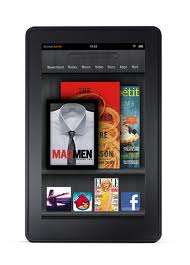
The Amazon Kindle Fire was released on Nov. 15, and shocked consumers with its $199 price tag. It seems like most of the rhetoric around the device has been its price, and while that certainly is a huge part of its success, it also has some pretty spiffy features.

I have a Fire and I've compared it to a friend's Barnes and Noble Nook and in just about every unscientific test, the Fire came out ahead. First of all, it feels great in the hand. It's a solid device that doesn't feel like you will break it in half if it gets roughed up a bit. The sleek edges feel like they could be an Apple product but they won't cost you an arm and a leg like some of that company's products.

The Fire also has a great app store. The Amazon App Store has thousands of apps with tons being added daily. The Free App of the Day feature is a really great benefit as well. I recently downloaded the My First Puzzles app after it came on the App of the Day and my little nephew has probably been using the device as much as I have lately. The free app offerings are a great touch.

In addition to apps, Amazon's Prime service is great for streaming movies, TV shows and borrowing books for free. The $79 subscription fee is a little steep but when you consider that there are more than 10,000 movie and television titles to be screened, the price seems almost insignificant.

The device is not without its drawbacks. There are the obvious points where it doesn't stack up to the iPad, like the lack of a camera or microphone but the Nook also bests the Fire in a few places. In a recent study by DisplayMate, the Fire was found to be twice as reflective as the Nook. The white balance also leaned a little to the yellow side.

I have noticed that the Fire's display doesn't seem quite as crisp as my friend's Nook, but as long as I am able to see the screen clearly, which I certainly can — probably better than on my laptop — I'm a happy camper. The Fire is a great device if you can get over the relatively poor display and at $199, it won't burn up your savings.

Margot is a technology writer and self-professed expert on how to get a deal using a Dell coupon

Waiting for Kindle Fire to Land

When Amazon announced the Kindle Fire in September, I quickly pre-ordered the device knowing that it would be a big seller. If all goes well I should have the Kindle Fire in had some time tomorrow so that I can share that experience with you. I have been using a Kindle for some time now and really enjoy reading on the device and look forward to experiencing reading on the Kindle Fire. Amazon relying on their Cloud Services has made it really easy to access my ebooks from the many devices that I use. As a company Amazon gets high grades from me for customer support and when my Kindle Reader arrives it will be registered and ready to use with my account. Amazon has done a marvelous job with the integration of their Whispernet network and I cam looking forward to a seamless experience with my Kindle Fire out of the box. More details in the coming days!

Amazon Announces the Kindle Fire for $199

Wow! Amazon announced today that they will be shipping on November 15th the Kindle Fire with a 7 inch color multi-touch screen for $199 dollars. With all the speculation it looks like they delivered on their promise of a highly functional reader complete with access to the web, ebooks, apps, music, and streaming video. At $199 dollars  they will carve out a niche for those consumers who were waiting on the sideline to jump into purchasing a tablet of their own. The Kindle Fire will be powered by a dual core processor and host a multi-touch screen (7" multi-touch display with IPS (in-plane switching) technology and anti-reflective treatment, 1024 x 600 pixel resolution at 169 ppi, 16 million colors) and come standard with Wi-Fi and a USB 2.0 Micro-B connector along with a the built-in Amazon Silk browser for fast web surfacing. The Kindle Fire is reported to be able to run for 8 hours on a full charge and can be charged with the wall AC Adapter or via a USB connection to a computer. The Kindle Fire will ship with has a native email client that can support Gmail, Yahoo!, Hotmail, AOL etc. Of course you will have access to the entire Amazon collection of music, videos, apps, and music which you can purchase for their store. This looks like the Amazon Kindle Fire will hit that sweet spot for a powerful but easy to use device that can serve as portable  tool when we are away from our desks. For now the Kindle Fire only support Wi-Fi,  but I would imagine if it is a success in the marketplace that we will see a 3G version as well. From the likes of it, it doesn't look like the Kindle Fire supports Bluetooth- but I will have to delve into that a little more. Amazon has put on their boxing gloves and looks to be in for the long haul as they position the Kindle Fire as an  alternative to Apple's iPad. At a price point of $199 dollars the Kindle Fire is sure to be a winner for consumers. The Kindle Fire can be pre-ordered now from Amazon for a mid November delivery.