CONTACT:
Brian S. Friedlander, Ph.D.
(908) 852-3460
brian (@) assistivetek.com
FOR IMMEDIATE RELEASE
PAPERSHOW Teacher’s Edition™ Ideal Tool for Special Education Co-Teaching Classrooms
International Society for Technology in Education (ISTE) Conference
The interactive writing solution is the Key to Effective Learning
PHILADELPHIA–June 26, 2011–AssistiveTek, LLC, top reseller of PaperShow For Teachers is excited to showcase the PAPERSHOW Teacher’s Edition™ , the key to effective learning, for the second time at the 2011 International Society for Technology in Education (ISTE) Conference, June 26-29 in booth 128.
The PAPERSHOW Teacher’s Edition is the ideal tool for use in special education and inclusion classrooms, helping teachers to create more visually appealing interactive presentations. With PAPERSHOW Teacher’s Edition™ teachers have access to a range of tools including, including an interactive calculator, magnifying glass, two measurement tools, lined paper for students learning to write and 72 different colors.
An essential tool for both the classroom and virtual teaching, PAPERSHOW consists of three elements: a wireless Bluetooth pen, a USB Key and interactive paper that work together to allow one to create a digital flip chart or annotate a Keynote or PowerPoint Presentation live. After a PAPERSHOW session, one can save it and then immediately print and/or email it to participants.
The PAPERSHOW Teacher’s Edition, combined with a projector and a computer, gives teachers the ability to transform their lessons and presentations into engaging interactions at a fraction of the cost of interactive whiteboards, as PAPERSHOW for Teachers costs just $249. The PAPERSHOW Teacher’s Edition starter kit, compatible with both Macs and PCs, includes one 128-page double-wired notebook, 30 sheets of interactive paper, one Bluetooth® digital pen, one 512MB Bluetooth ® USB Key with software embedded, one interactive extra toolbar, a ring binder, pen case and other accessories.
“The PAPERSHOW Teacher’s Edition is a great piece of technology. It will help to support co-teaching models in the classroom, when there is a special education and regular education teacher in the same classroom, and allow all students’ needs to be met inside the classroom,” said Diana Scharer, Special Education Teacher, Township of Union, Union, NJ. “With PAPERSHOW Teacher’s Edition, the special education teacher can record the notes and graphics and have them available for all students at the end of the period.”
The PAPERSHOW Teacher’s Edition works with Windows XP, Vista and 7 and the Mac operating systems Tiger, Leopard and Snow Leopard. PAPERSHOW features six different colors, three different brushstrokes, perfect shapes, lines and arrows all of which bring presentations, meetings and classes to life.
“Being able to export the notes in a PowerPoint and PDF format makes it great for students who need visual supports and accommodations. PAPERSHOW Teacher’s Edition speaks to the heart of Universal Design for Learning and offers all student s the classroom the benefits of a highly interactive and visual appealing notes,” Scharer continued. “Teachers who are using PAPERSHOW Teacher’s Edition enjoy the fact that they can move about the classroom and put their ideas up on the board as well as having students record their ideas on the digital notepad from their desks.”
For more information, and ideas on how to use PAPERSHOW Teacher’s Edition in the classroom, visit, assistivetek.blogspot.com
###
About AssistiveTek, LLC
Since 2000, AssistiveTek, LLC has been providing products and professional services in the area of educational and assistive technology to educators. AssistiveTek, LLC delivers innovative products that help students to visualize ideas and concepts and helps teachers to integrate these tools in the curriculum.
AssistiveTek, LLC is one of the leading resellers of PAPERSHOW Teacher’s Edition in the United States and provides support and in-service programs to demonstrate how this innovative technology can be used in the classroom to support all learners.
Showing posts with label Canson. Show all posts
Showing posts with label Canson. Show all posts
PaperShow for Teachers is a Big Hit at MacWorld 2011
I'm back from spending a couple days in San Francisco at MacWorld 2011. MacWorld 2011 was very well attended and it was great having the opportunity to speak to so many educators at the Canson Booth, as we demoed PaperShow for Teachers. It was very energizing to watch so many people get really get excited about the product and the solution that we were offering. Many teachers liked the fact that they could walk around with the notebook and were not chained to the front of the classroom. We had other educators who really liked the idea that it could be used to annotate Keynote or PowerPoint presentations. Others were excited that they could use PaperShow for Teachers when they are doing webinars and online learning.
While I was MacWorld 2011 Conference I was interviewed by Mike Schramm from the The Unofficial Apple Weblog which was streamed via UStream. I had a chance to demo PaperShow for Teachers and share with the audience a thing are two about the program. You can watch the interview below.
While I was MacWorld 2011 Conference I was interviewed by Mike Schramm from the The Unofficial Apple Weblog which was streamed via UStream. I had a chance to demo PaperShow for Teachers and share with the audience a thing are two about the program. You can watch the interview below.
The "PaperShow Guy" is Off to MacWorld 2011

Sharing Ideas with PaperShow for Teachers in the Classroom


While many PaperShow for Teachers users-use it to deliver more engaging presentations, PaperShow for Teachers is an ideal tool for actively engaging students when they need to analyze or annotate images, diagrams or pictures. Using the PaperShow for Teachers application that resides on the USB key you can quickly bring in a series of images- print them using a color printer on the 8 1/2 x11 interactive paper and be ready to use them with the digital pen to mark up. Simply place the images you would like to use in a folder and PaperShow for Teachers will dutifully import them and get them ready to print on the interactive paper.Once the images are printed on the paper you can use all of the PaperShow for Teachers tools to annotate and mark up the images. This feature gives teachers the flexibility to bring in whatever pictures they need for a particular lesson. Once you do one time you will see just how easy it is do accomplish and how much fun it is to use in the classroom. So make you lessons more interactive by printing images with PaperShow for Teachers and then pass the binder with the images around the classroom to engage the students. Using images, students can identify certain features on the picture, comment about the picture, add additional ideas and then save them if it so desired.
At just $249 dollars, PaperShow for Teachers gives you tremendous value and a way to engage students in the classroom by providing them more opportunities to participate and interact with ideas and images. Contact me if you would like a free demonstration of PaperShow for Teachers.
Using PaperShow for Teachers in the Music Classroom

I found a rather good site to download some staffs in the landscape mode and then I launched PaperShow for Teachers, imported the musical staff into the application and then printed it on the PaperShow for Teachers interactive paper on my HP Color Inkjet printer. Once I had the page printed I was able to draw the G Clef and add a couple of notes. Now imagine for a moment that you are a music teacher in the classroom just how handy this could be. Everyone can clearly watch you as you write the notes on the staff and when you are through you can export it as a PDF and send it to all of your students.
Supporting Students in the Classroom with PaperShow for Teachers
For many students with learning disabilities, taking notes can be a daunting task. In classrooms where teachers are providing in-class support having access to PaperShow for Teachers can be invaluable. PaperShow for Teachers is a digital pen and paper technology that allows teachers to easily share written notes with the entire classroom. Simply plug in the PaperShow for Teachers USB key into your Mac or PC and start writing on the notebook paper that is supplied. With your computer connected to a data projector now all of the students can see what is recorded in real time. Just imagine for a moment that as the support teacher, you are writing the notes with PaperShow for Teachers and everything that you are recording is able to be seen by the classroom. After the class is over you can easily save what you have recorded and export the notes as a PDF or PowerPoint file.
So if you are looking for way to add a new strategy to your bag of tricks - look no further and give PaperShow for Teachers a try. For more information please feel free to contact me via email.
Presentation Tip with PaperShow for Teachers

Launching New Blog for PaperShow for Teachers

ISTE 2010- PaperShow for Teachers
In about a week's time I will be heading to Mile High City to participate in what I consider to be one of the most exciting educational technology conferences in the United States. I have been fortunate to be able to attend the ISTE conferences over the past couple years and am looking forward to attending ISTE 2010 which is being held in Denver this year. I will be helping out at the PaperShow Booth as they launch PaperShow for Teachers, a new and exciting presentation tool for the classroom. I have been using PaperShow for the last year or so in my classroom and it is exciting to see the product evolve. PaperShow has allowed me the flexibility to go into any classroom and make my lessons more interactive and allows me to capture and share classroom notes almost instantaneously as a PowerPoint or PDF file.PaperShow for Teachers, will add a whole new array of tools and set of interactive papers that I know teachers will find a welcome addition to their educational technology classroom toolkit. PaperShow for Teachers will add a wide array of new color palettes that can be used as well as math tools for calculations and the measurement of lines and angles. Teachers will be able to use the Reveal tool, to hide part of the screen which can come in handy for displaying questions and their solutions. So whether you want to use PaperShow for Teachers as a digital flip chart or to annotate your PowerPoint or Keynote presentations you will find PaperShow to be an affordable and easy to use tool to jazz up classroom lessons. If you plan on attending ISTE 2010, stop by and say hello, I will be in the PaperShow Booth # 792. So plan on stopping by Booth #792 and get a chance to see for yourself what all the excitement is about as we launch PaperShow for Teachers.
Importing a List of Images into PaperShow
For the past year I have used PaperShow extensively in my teaching and when I am doing workshops and presentations. I have primarily used PaperShow as a digital flipchart which has really worked out really well. Recently, I have begun to use PaperShow when teaching my graduate course in Action Research to make my PowerPoint presentations more interactive and engaging which has put a whole new spin on how I am using this innovative and exciting product. Having said this, there may be times in the classroom or in your training session that all you want to do is to be able to show and annotate images and don't really have the need for a full blown PowerPoint presentation. So the question is- is there a way for me to bring in just a list of images that I can then show and annotate? Of course the answer is a resounding yes! In fact you can import jpg, gif, and png files into the PaperShow application and then print them on the 8 1/2 x 11 PaperShow paper so that you can annotate on top of them. If you plan on importing a series of images I would recommend that you place all of the images that you want to use in a folder which will make it easier to import as you will see in the video below. So go ahead and feel free to use PaperShow just with a list of images. This technique works equally well on the Mac and on a PC.
Canson to Launch PaperShow for Mac at MacWorld 2010
 For the past year I have been using PaperShow extensively when I teach, do presentations, and for webinars. It has been a really indispensable tool and I carry PaperShow in my bag wherever I go. Because of PaperShow's ease of use and portability I can walk into any room and within seconds have a digital flipchart ready to go, to share and capture ideas. I have written about my experiences with PaperShow on this blog for the past year and from day one have asked Canson "when will we see PaperShow for the Mac?" Well that day is finally coming and I am happy to share with you that Canson will launch PaperShow for Mac this week at the MacWorld 2010 Conference to be held in San Francisco.
I have worked closely with Canson during this past year and I will be going to MacWorld 2010 to help them launch their new product. I have been working with PaperShow for Mac for the past couple of weeks and in some ways it is even easier to use than the Windows version. With all of the functionality of the Windows version and the ease of use of the Mac this is a real winner. So if you plan on attending MacWorld 2010, stop by the PaperShow Booth in the Exhibitor Hall-Booth 746 and say hello. I will also be doing a presentation on Friday February 12th, a Product Spotlight Session: Make Your Presentations Come to Life with PAPERSHOW for the Mac from 1:30 PM - 2:00 PM. So stop by the booth or come and learn more about PaperShow for the Mac at my presentation.
Using PaperShow with PowerPoint
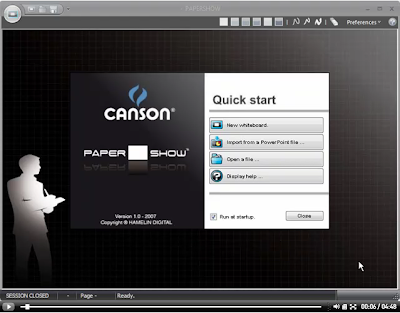 In previous blog posts I have shared with you how I am successfully using PaperShow in my classes as a digital flipchart. It has been great to be able to write my ideas on the interactive digital paper and have them show up on the screen. Using the computer and the data projector with PaperShow has really made it easy for me to communicate ideas and have them displayed for my students on the screen. What is nice is that there is no hardware and software to install-everything you need is on the PaperShow USB Bluetooth Drive.
This past week I explored another feature of PaperShow which allowed me to import a PowerPoint presentation into the PaperShow software and print it out on the supplied interactive paper. Once you have printed your PowerPoint presentation out on the interactive paper you can now take out your digital pen and mark it up so that your paprticpants see the slide with your written annotations. If you have not used digital pen technology there is a "wow factor" that comes over others watching as you write with a pen and they see the changes being made live to your presentation. I have created a short screencast to show you how to import your PowerPoint presentation into PaperShow. Enjoy! Brian
Papershow Coming Real Soon!
 First, I would like to thank Molly from Bell Pottinger USA for sending me a sample Papershow Kit. For some reason I have been attracted to digital pen technology for the past 6 years or so and have tried a lot of the solutions that are now available that take advantage of Anoto functionality. Just last week I was fortunate enough to be able to try Papershow which is a new digital pen solution from Canson a European paper company who will release this solution the end of the week. In the kit I received a digital pen, a Bluetooth USB key, and two pads of interactive paper. The current solution only runs on Windows at this time and when you plug in the Bluetooth USB key the setup software launches and downloads the latest version of the Papershow software application to the Bluetooth USB key which also serves as Flash drive. Once the installation was complete I was took the cap of the digital pen off and it paired with the Bluetooth receiver. Now I was ready to go. I took out a piece of the A4 interactive paper and started to write on it and instantaneously whatever I write came up on the computer screen. I have recently done several demonstrations in my graduate cl assess of this technology and all of my students whom are teachers themselves said they wanted one. On the right side panel of the A4 interactive paper you have controls to change the width of the pen stroke, change the colors and draw basic lines, arrows, circles and squares. You can also fill the circles and squares with a color and highlight text with the highlighting tool. You can even erase your writing and objects on the computer with the eraser tool. To add another page simply click on the add page icon and you are presented with a clean slate. Having the Papershow pen and interactive paper gives you the freedom to walk around the class with a very light weight interactive tool. I was able to move throughout my classroom without a hitch. The digital pen and Bluetooth USB key worked flawlessly-recording all of my pen strokes. My graduate students were very excited with what they saw and all wished they could have one in their class to engage their students and I had with mine.
I passed the interactive paper and pen to each of my students so that they could have a try at using some of the features. They all found the interface very easy to use and within seconds they were able to use all of the features. For one of their class projects they need to create a video
 tutorial of them teaching a user how to use a piece of software. I demonstrated how they might use Jing and Papershow to model how to a specific type of math problem which they could then post to a web site. Using Papershow the students were able to create a screencast demonstrating how to do a simple multiplication process. With the Papershow application on the screen we started up Jing and my student recorded the process of a simple multiplication problem. Working with digital pen makes doing this type of task very easy to do. You will see in the screencast just how easy it was for my student to create the screencast.
While I found and education use for this program I could see this tool being very effectively used in a business meeting to capture ideas and share them immediately after the meeting. The Papershow software allows one to save the session as well as Export to a PDF, which makes it very easy to share the session after the meeting has adjourned. I have not had a chance to try it just yet, but in the Papershow Kit you will find 8 1/2 x 11 interactive paper to print your PowerPoint slides on which can then be marked up and annotated with the digital pen. There are lots of creative ways to use this technology and I for one, will begin to explore more of these avenues in the future. As I shared with Molly, I think that there is a real place for this type of technology in K-12 and higher education. I especially think that integrating this technology into distance learning classes could be a real winning solution. So if you have the chance take a look at Papershow Kit which will be sold at Staples.com. The Showpaper Kit will be sold for $198.00 dollars and will give you everything you need to get started. Paper Pricing is as follows
o $19.98 for 200 sheets of printer paper
o $19.98 for large, conference-room sized brainstorming pad (size A3)
o $12.98 for small brainstorming pad (size A4)
Check it out you will be glad you did- Brian
Subscribe to:
Comments (Atom)