
I have been using the Livescribe Smartpens since it was released and have recommended it to countless teachers and students to help support their learning. The ability to link audio to the ink on the page is really ingenious and is a wonderful tool for students who have difficulty listening to lectures and taking notes at the same time. With a simple tap of the pen on the paper the notes can be listened to which is a real game changer for students. With the introduction of the Livescribe Sky WiFi Smartpen, archiving and syncing has changed; all accomplished via WiFi and a Evernote account. Now without having to think about it you can do your work and your notes are archived in the cloud and accessible via any device connected to the internet. A dream come true for many us who want to have access to our notes. While there are other services that let you save notes in the cloud, the Livescribe Sky Wifi Smartpen gives you the ability to store your notes and audio in one place- which is fantastic. While there are lots of ways to use the Livescribe Sky WiFi Smartpen in schools, let me suggest one which could have powerful learning ramifications.
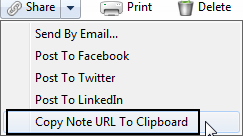 With the move to the least restrictive environment it is not unusual when looking at a child's I.E.P. to find that many students who are in the mainstream are being supported by a special education teacher or instructional aide in their general education classroom. Having an extra pair of hands and eyes is a great accommodation for students who may need the extra support in the mainstream. Now what would happen if that special education teacher used the Livescribe Sky Wifi Smartpen to take notes for those students that have it in their I.E.P. as an accommodation? Now we are talking! The Livescribe Sky Wifi Smartpen can be used to share just the notes (ink) or the ink and audio- it all depends on how it is going to be utilized. Now that the Livescribe Sky Wifi Smartpen syncs with Evernote-sharing the notes just got a whole lot easier! You see from within Evernote, with a click of the mouse you can make the note shareable via a URL. Once you have the URL you can post it on your website or portal and now every student that needs access to the note can access it from any browser connected to the web. Supporting students with notes just got a whole lot easier and enable you to provide the notes or the notes and associated audio. With you in control of the Livescribe Sky Wifi Smartpen you can decide which makes the most sense and provide your students with a great digital support. Providing students with classroom notes just got a lot easier and one that I know your students will love to access. So if you are a special education teacher who is doing in-class support think about how you can use the Livescribe Sky Wifi Smartpen to take note taking to whole new level- you will be glad you did!
