Pages

Showing posts with label Nook Color. Show all posts

The Kindle Fire: Fully Loaded If A Little Fuzzy


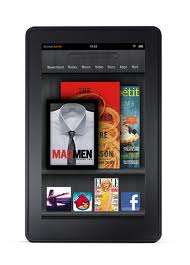
The Amazon Kindle Fire was released on Nov. 15, and shocked consumers with its $199 price tag. It seems like most of the rhetoric around the device has been its price, and while that certainly is a huge part of its success, it also has some pretty spiffy features.

I have a Fire and I've compared it to a friend's Barnes and Noble Nook and in just about every unscientific test, the Fire came out ahead. First of all, it feels great in the hand. It's a solid device that doesn't feel like you will break it in half if it gets roughed up a bit. The sleek edges feel like they could be an Apple product but they won't cost you an arm and a leg like some of that company's products.

The Fire also has a great app store. The Amazon App Store has thousands of apps with tons being added daily. The Free App of the Day feature is a really great benefit as well. I recently downloaded the My First Puzzles app after it came on the App of the Day and my little nephew has probably been using the device as much as I have lately. The free app offerings are a great touch.

In addition to apps, Amazon's Prime service is great for streaming movies, TV shows and borrowing books for free. The $79 subscription fee is a little steep but when you consider that there are more than 10,000 movie and television titles to be screened, the price seems almost insignificant.

The device is not without its drawbacks. There are the obvious points where it doesn't stack up to the iPad, like the lack of a camera or microphone but the Nook also bests the Fire in a few places. In a recent study by DisplayMate, the Fire was found to be twice as reflective as the Nook. The white balance also leaned a little to the yellow side.

I have noticed that the Fire's display doesn't seem quite as crisp as my friend's Nook, but as long as I am able to see the screen clearly, which I certainly can — probably better than on my laptop — I'm a happy camper. The Fire is a great device if you can get over the relatively poor display and at $199, it won't burn up your savings.

Margot is a technology writer and self-professed expert on how to get a deal using a Dell coupon

Five Questions to Ask Before You Buy a Dedicated eReader

I have been using eReaders for some time now and really enjoy the convenience and ease of use of these dedicated devices. In my travels to schools, I am beginning to see more and more schools pilot eReaders in the classroom, especially for students who struggle or who are unmotivated to read. Teachers see the value of students being able to change the size of the font and easy access to the dictionary feature. For many students who struggle in reading many are now more motivated to read on an eReader device as compared to a traditional book. Students can also peruse the Electronic Bookstore and of course with teacher permission download sample chapters from books to see if it will pique their curiosity to engage them in the reading process. But before you go out and purchase an eReader here are some questions you should think about:

1) Do I have access to WiFi in my school or building?

Many of the eReader's support WiFi as well as 3G which will enable you to download books directly to the device without the need to use a computer. If your school has a good WiFi infrastructure then you can save a considerable amount of money by buying the WiFi model of the eReader. For example the  Amazon Kindle Touch with WiFi is $99 dollars compared to the Amazon Touch WiFi/3G model which is $149  dollars. If your schools doesn't support WiFi then you should consider the Kindle Touch WiFi/3G model which would allow you to download books over the air using the 3G network. There is no extra data costs associated with using the Kindle Touch WiFi/3G model for downloading books to the devices.

2) How long can  I expect my dedicated eReader to stay charged?

Many of the dedicated eReaders that utilize E Ink technology can stay charged for long periods of time under normal use. The E Ink technology mirrors that of a traditional page and uses minimal battery life to render the black text on a white background. eReaders like the Kindle Touch and Nook that utilize E Ink technology can stay charged for up to 2 months- which is really incredible if you will be using in a school setting. eReaders that utilize E Ink technology assume that you will be reading the book with a lot of ambient light available.

3) Where can I purchase my books?

All of the major re-sellers of eReaders like Amazon, Bares & Noble, & Kobo provide the user with one stop shopping in their online book store. The online bookstore can be accessed from the devices and books can be quickly downloaded to the devices over WiFi or the 3G network. If you are purchasing books for a school you should investigate getting a corporate or school account with the companies so that you can purchase books with a school Purchase Order

4) Can I read other materials beside books on the dedicated eReader?

In addition to books many of the eReaders also support reading magazines, newspapers, blogs as well as your own personal documents in various formats ie. PDF & Word. When you purchase an Amazon Kindle you are provided with unique email address that you can send Word or PDF documents to, which can be delivered to your Kindle over the WiFi network. This feature is handy for students who want to read their documents on their eReaders

5) How important is having audio and Text to Speech capabilities on my eReader?

While eReaders are great for reading books some eReaders like the Kindle Keyboard and Kindle Touch also support playing audio books from Audible.com as well as reading text on the screen if the Text to Speech capabilities have been enabled by the book publisher. For students with reading disabilities or for those who struggle to read having the text to speech capabilities is a great feature.Likewise, being able to listen to a professionally narrated book from Audible can be very motivating for students who need to reengage with text.

I hope these questions and answers have provided you with some food for thought when you are planning to purchase eReaders. If you have any questions about eReaders, please feel free to email me. If you are interested I am available to run workshops on using eReaders in the classroom.